「自訂手機版背景」
• 可自訂為品牌主色、產品意象或活動視覺,持續傳遞,強化記憶點
• 相較純白或單調背景,自訂背景能讓網站畫面更有層次感與視覺吸引力,提升用戶停留時間與瀏覽意願,特別適合年輕族群或強調視覺體驗的品牌
• 可依不同檔期更換背景圖,如母親節柔和花圖、雙11用科技感圖騰,創造節慶氛圍,讓用戶每次打開手機逛站都能感受到新鮮與驚喜
✎ 重點拆解:
一、「自訂手機版背景」設定路徑
二、「自訂手機版背景」語法
▪ 背景以圖片顯示
▪︎ 背景以顏色顯示
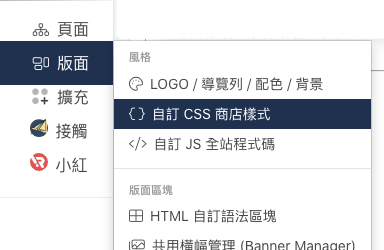
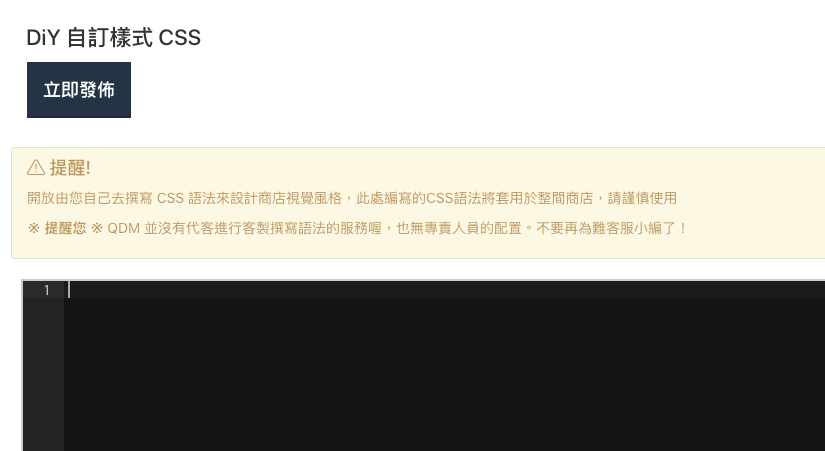
一、「自訂手機版背景」設定路徑
設定路徑:版面 > 自訂CSS商店樣式。
二、「自訂手機版背景」語法
▪︎ 背景以圖片顯示
/* General Smartphones (portrait and landscape) */
@media only screen and (max-width: 768px),
/* iPhone 6 in portrait */
only screen and (min-device-width : 375px) and (max-device-width : 667px) and (orientation : portrait),
/* iPhone 6 Plus in portrait */
only screen and (min-device-width : 414px) and (max-device-width : 736px) and (orientation : portrait) {
body {
background-image:url(背景圖連結);
}
}
▪︎ 背景以顏色顯示
/* General Smartphones (portrait and landscape) */
@media only screen and (max-width: 768px),
/* iPhone 6 in portrait */
only screen and (min-device-width : 375px) and (max-device-width : 667px) and (orientation : portrait),
/* iPhone 6 Plus in portrait */
only screen and (min-device-width : 414px) and (max-device-width : 736px) and (orientation : portrait) {
body {
background-color: rgb(251, 245, 210);
}
}
這篇文章是否有幫助?
太棒了!
感謝您提供意見回饋
抱歉,沒能幫到您
感謝您提供意見回饋
意見已發送
感謝您的寶貴意見,我們將嘗試修改這篇文章